These guidelines are provided to help you get the highest quality results without incurring unnecessary costs or delays.Acceptable File Formats
- Adobe Photoshop (.psd or .tif)
- Adobe Illustrator (.ai or .eps)
- Adobe Acrobat (.pdf) uncompressed
- We CANNOT accept the following file formats: indd, cdr, qxd, doc, fhx, ppt, xls, plt
Resolution Requirements
- Resolution must be at least 100 DPI and no more than 125 DPI @ 100% actual print size
- If the template is created at half scale, you need to double the DPI to a minimum of 200 DPI
- For best results, all images in your file should be at the same resolution
- Check the resolution on your file. Zoom in to your artwork at 100% and examine for pixilation.
Other Requirements
- Convert fronts to outlines. Do this as a final step and saved as a new file. Once converted, you can no longer edit the text via the text tool.
- Embed all images versus linking them
Template Guidelines
- Templates can be located on each product page, directly below the image. See the second tab – "Templates & Instruction"
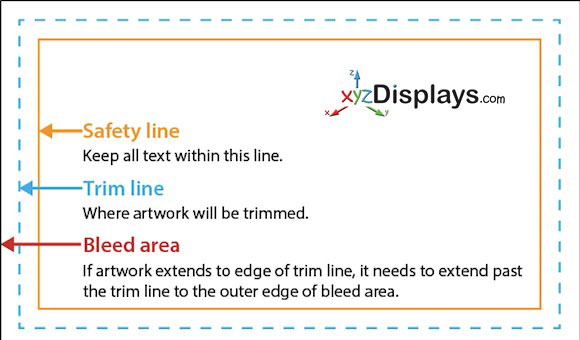
- Critical elements such as your logo, key images and text should be kept within the safe area
- Background elements should extend to the full size of the document, past the trim line and into bleed area
- See template example below
Graphic Templates Tutorial: How to Use Templates to Design
Do not hesitate to call (973-515-5151) or email (
[email protected]) with any questions!
If you need further guidance, please see our detailed art
guidelines:
xyzDisplays Detailed Artwork Guidelines
**Note: xyzDisplays is not responsible for proofreading customer supplied files